MVX AI · for Adobe Premiere Pro
MVX editsyour music video.You take the credit.
A Premiere Pro plugin that organizes your footage, cuts to the beat, and picks the best shots for you.
7-day money-back guarantee
For
Premiere Pro
Plan
$49 / month
Best for
Music videos
Runs on
macOS · Windows
Watch it work · 2 min
Top creators save hours every day with MVX.
Editing a music video by hand is brutal.
You know it. We know it.
- Hundreds of cuts. By hand. On every beat. For a 3-minute song. Yeah.
- Client wants it tomorrow. You haven't even opened Premiere yet.
- 50 clips and you're scrubbing through every single one like it's 2015.
- The footage is fire. Your motivation to edit it? Not so much.
What if AI just... did it for you?
Three steps. Done.
Each step is automatic on your side. Review and refine when you're ready.
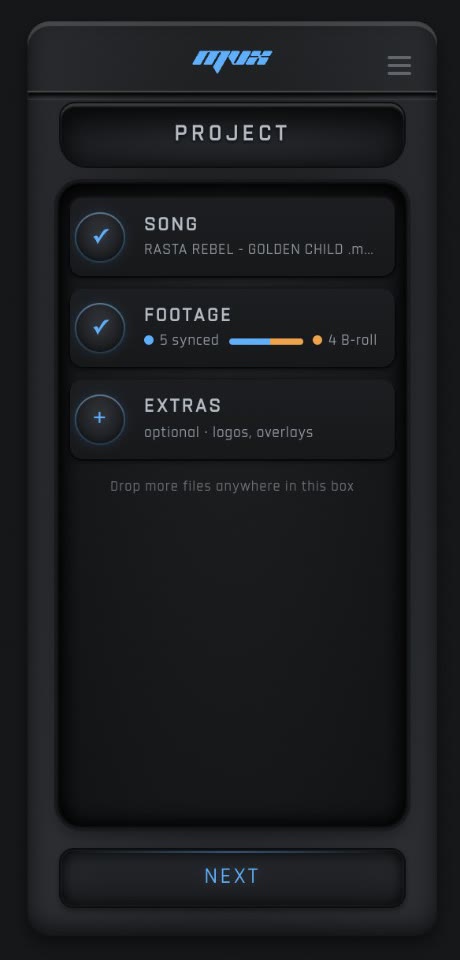
Drop your clips and song.
MVX figures out which clips are performance and which are B-roll, then sorts everything into bins. You didn't lift a finger.
Every cut on the beat.
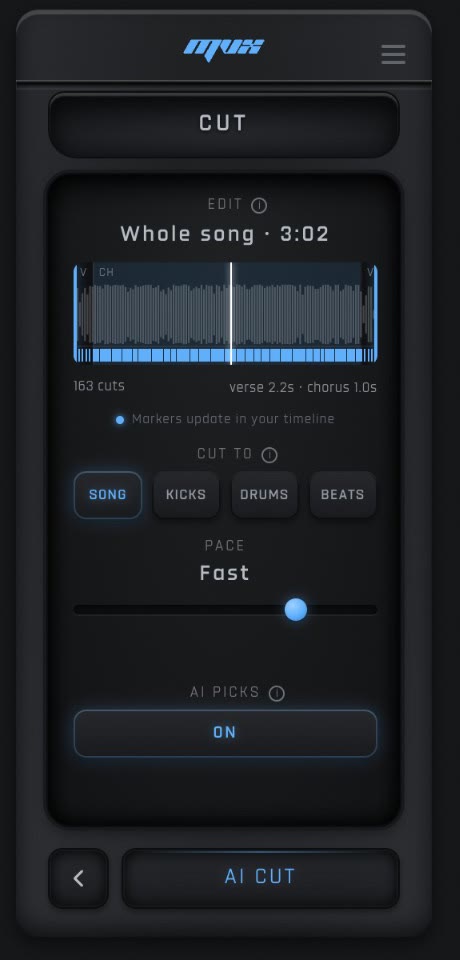
MVX listens to the song, finds the kicks, drums, and full grid, and places cuts exactly where they should land.
AI picks the best shot.
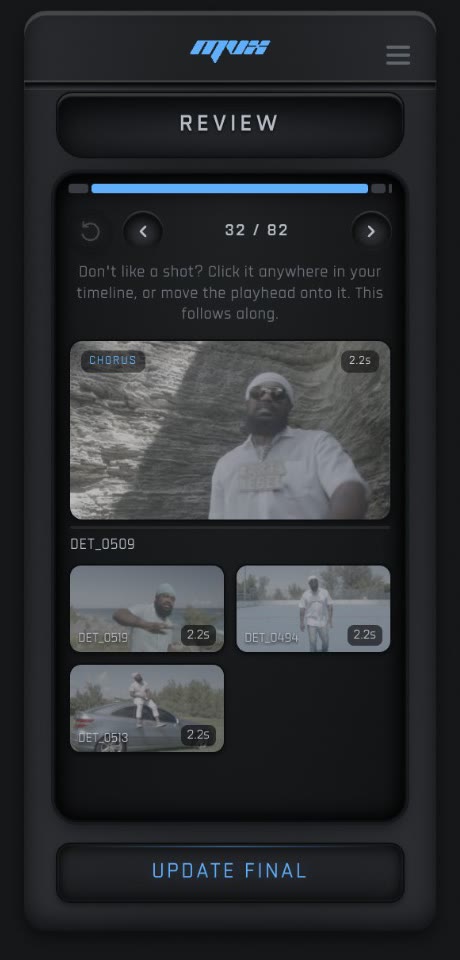
Composition, energy, variety. AI watches every clip you have and picks the winner for every cut - like a real editor would.
Editors. And artists too.
You cut music videos for a living. MVX takes the boring 80% off your plate.
"As a video editor who edits tons of music videos, this is a must-have. An absolute game-changer."
You make music. Now you can edit your own videos without hiring anyone.
"I'm a music producer that doesn't have a lot of time. Thanks for saving me time and getting a dope result."
Let it run, or drive yourself.
Auto for speed. Manual when you've got a vision. The AI shot picker works with both.
Detect the beats. Place the cuts.
MVX scans the song, finds the BPM, separates the stems, and drops markers at every beat you care about - kicks, drums, or the full grid. No tapping. No counting.
// fastest path to a finished cut
Bring your own cut points.
Already marked the cuts you want? Place sequence markers in Premiere, hit start, and MVX snaps your clips to them - same AI shot picker, same one-click timeline.
// for editors with a vision
Effects you'll actually use.
One tab for transitions. One tab for looks. Click to apply, or let MVX scatter them across your sequence markers.
- 8TransitionsFlash, punch, flicker, white flash, zoom.
- 10LooksOne click and it sits on top of your clip - no nesting, no adjustment layers.
Real editors. Real time saved.
“Saves a lot of time. Normally I avoid auto edit plugins because I thought they'd deliver a lower quality product, but this one actually makes a difference. The option to review every cut keeps it on your preference, and the rough cut is done completely automated.”
“I really like the intensity slider and quick shot-swap features because they give me control over the vibe of the edit without being locked into one automated style. It doesn't replace creative editing, but it definitely takes care of the repetitive parts.”
“I'm a Music Producer that doesn't have a lot of time. I was hesitant because I promote my beats with videos I edit from stock footage. I see MVX, think okay that's kinda cool, and could be a time saver. THANKS for saving me time and getting a dope result.”
“PXLSAFE is a game-changer for music video editors. Instead of spending hours organizing raw footage, this Premiere Pro plugin does the heavy lifting for you. It automatically sorts through your clips, syncs them to the beat, and selects the best shots.”
“I wish this was a thing 10 years ago. No joke, my workflow is at least 80–100x faster than it used to be. It's super easy to use, insanely fast, and truly one of the most crazy purchases I've made as a creative. A run-and-gun director's secret weapon.”
“I edit a lot of short content clips and music videos for artists, and a lot of times I have really fast turnaround times. MVX has streamlined my workflow, making these fast turnaround edits a lot easier and giving me more time to focus on creativity.”
“Diving into a session with a ton of content, unfamiliar with the project because you were not the person who captured the footage, and pressed for time. Does this resonate? MVX provides a way to assess large edits before going old-school on them.”
“MVX has been a strong addition to my video toolkit. The presets look professional out of the box, and the controls make it easy to dial in a unique look quickly. It's lightweight, renders fast, and hasn't introduced crashes or slowdown.”
“I love how everything is so easy to control and makes you feel like you know what you're doing. And also AI ???? THIS IS SUCH A LIFE SAVER! The data plugin as well is so clean. Thank you PxlSafe for making my life easier and faster!”
“This is not merely a tool for convenience, it is a redefinition of pacing in digital editing. What used to take ten hours can now be roughed out in under two, leaving more time for color grading, VFX, or fine-tuning narrative beats.”
“This plugin is 10/10. I am amazed and just really blown away at how efficient this is! Y'all made an amazing product. When I saw this plugin was available I was quick to purchase it. Thank y'all for creating a fantastic product.”
“I've been testing the MVX + FXLab bundle and it's honestly a powerful combo for editors. Huge time-saver — MVX organizes clips, syncs to the beat, and builds a rough cut in minutes. Smart automation, lets you swap shots easily.”
“Honestly, the first step alone makes MVX worth it. Auto importing and splitting clips across tracks is something I didn't know I needed until I saw it happen. The review player where you can swap shots is also really cool.”
“Used it for the first time and normally how I edit my music videos it took me +10 hours. With MVX I finished the video under 1 hour with all manually picking the clips. Great plugin, after a few changes it will be perfect.”
“As a video editor who edits tons of music videos, this is a must-have! An absolute game-changer. It saves so much time in my workflow, very easy to use and incredibly efficient. For the price, it's an absolute steal!”
“Purchased this product not knowing what to fully expect, but I can assure you it definitely works great! Considering they're going to be updating and improving constantly, very glad I found this so early.”
“The functionality is solid, and it's made my workflow smoother and more efficient. I'm excited to see how it evolves with future updates. Definitely recommend it if you're considering it.”
“This plug-in is a total game changer!!! It does everything you need it to do plus more. If you are looking to save hours of editing and still be able to add your own touch, this is it.”
“Saves a lot of time. Normally I avoid auto edit plugins because I thought they'd deliver a lower quality product, but this one actually makes a difference. The option to review every cut keeps it on your preference, and the rough cut is done completely automated.”
“I really like the intensity slider and quick shot-swap features because they give me control over the vibe of the edit without being locked into one automated style. It doesn't replace creative editing, but it definitely takes care of the repetitive parts.”
“I'm a Music Producer that doesn't have a lot of time. I was hesitant because I promote my beats with videos I edit from stock footage. I see MVX, think okay that's kinda cool, and could be a time saver. THANKS for saving me time and getting a dope result.”
“PXLSAFE is a game-changer for music video editors. Instead of spending hours organizing raw footage, this Premiere Pro plugin does the heavy lifting for you. It automatically sorts through your clips, syncs them to the beat, and selects the best shots.”
“I wish this was a thing 10 years ago. No joke, my workflow is at least 80–100x faster than it used to be. It's super easy to use, insanely fast, and truly one of the most crazy purchases I've made as a creative. A run-and-gun director's secret weapon.”
“I edit a lot of short content clips and music videos for artists, and a lot of times I have really fast turnaround times. MVX has streamlined my workflow, making these fast turnaround edits a lot easier and giving me more time to focus on creativity.”
“Diving into a session with a ton of content, unfamiliar with the project because you were not the person who captured the footage, and pressed for time. Does this resonate? MVX provides a way to assess large edits before going old-school on them.”
“MVX has been a strong addition to my video toolkit. The presets look professional out of the box, and the controls make it easy to dial in a unique look quickly. It's lightweight, renders fast, and hasn't introduced crashes or slowdown.”
“I love how everything is so easy to control and makes you feel like you know what you're doing. And also AI ???? THIS IS SUCH A LIFE SAVER! The data plugin as well is so clean. Thank you PxlSafe for making my life easier and faster!”
“This is not merely a tool for convenience, it is a redefinition of pacing in digital editing. What used to take ten hours can now be roughed out in under two, leaving more time for color grading, VFX, or fine-tuning narrative beats.”
“This plugin is 10/10. I am amazed and just really blown away at how efficient this is! Y'all made an amazing product. When I saw this plugin was available I was quick to purchase it. Thank y'all for creating a fantastic product.”
“I've been testing the MVX + FXLab bundle and it's honestly a powerful combo for editors. Huge time-saver — MVX organizes clips, syncs to the beat, and builds a rough cut in minutes. Smart automation, lets you swap shots easily.”
“Honestly, the first step alone makes MVX worth it. Auto importing and splitting clips across tracks is something I didn't know I needed until I saw it happen. The review player where you can swap shots is also really cool.”
“Used it for the first time and normally how I edit my music videos it took me +10 hours. With MVX I finished the video under 1 hour with all manually picking the clips. Great plugin, after a few changes it will be perfect.”
“As a video editor who edits tons of music videos, this is a must-have! An absolute game-changer. It saves so much time in my workflow, very easy to use and incredibly efficient. For the price, it's an absolute steal!”
“Purchased this product not knowing what to fully expect, but I can assure you it definitely works great! Considering they're going to be updating and improving constantly, very glad I found this so early.”
“The functionality is solid, and it's made my workflow smoother and more efficient. I'm excited to see how it evolves with future updates. Definitely recommend it if you're considering it.”
“This plug-in is a total game changer!!! It does everything you need it to do plus more. If you are looking to save hours of editing and still be able to add your own touch, this is it.”
“I recently purchased the MVX plugin on PxlSafe and I must say I am truly impressed. This automatic editing tool is simply excellent — fast, intuitive, and very efficient.”
“This extension is amazing! I use it all the time. This actually makes me want to go out and shoot way more knowing how much time I'm saving in the editing room.”
“This has been the most useful Premiere extension I have purchased. I have saved so much time clipping footage, and customer support is super fast and helpful.”
“I use the MVX plugin to edit my hanging mic music videos and it literally only takes about 5 minutes to fully edit videos that used to take me about 2 hours.”
“Saves you tons of time, you can quickly get a rough cut and get to editing within 5 minutes. Highly recommend to any professional video editor.”
“This software has helped me tremendously. I've recommended it to all my editing buddies. It saves me so much time. I can't thank you more.”
“This was a life changer. I couldn't even focus due to how much work I had. This made turnaround time to almost nothing.”
“Great plugin has helped me a lot for music videos since all you have to do is choose the best clips for the scenes.”
“What else can I say? This thing is insane. Check out the link in my video so you can see how popping it is.”
“Saves me countless hours of going back and reviewing footage, able to do quick turnarounds for clients.”
“MVX saves me so much time on my turnaround time and makes editing videos even more fun.”
“This plugin is fire — it saves so much time cutting, especially with the new update.”
“This plug-in is amazing. It also helps me with my workflow in DaVinci.”
“This is the best tool I have ever used. I loved it. 100% recommended.”
“The best quick editing software to ever be made for music videos.”
“This thing has changed how I edit my music videos.”
“Absolutely insane how well this plugin works.”
“One of the best purchases I have ever made.”
“I recently purchased the MVX plugin on PxlSafe and I must say I am truly impressed. This automatic editing tool is simply excellent — fast, intuitive, and very efficient.”
“This extension is amazing! I use it all the time. This actually makes me want to go out and shoot way more knowing how much time I'm saving in the editing room.”
“This has been the most useful Premiere extension I have purchased. I have saved so much time clipping footage, and customer support is super fast and helpful.”
“I use the MVX plugin to edit my hanging mic music videos and it literally only takes about 5 minutes to fully edit videos that used to take me about 2 hours.”
“Saves you tons of time, you can quickly get a rough cut and get to editing within 5 minutes. Highly recommend to any professional video editor.”
“This software has helped me tremendously. I've recommended it to all my editing buddies. It saves me so much time. I can't thank you more.”
“This was a life changer. I couldn't even focus due to how much work I had. This made turnaround time to almost nothing.”
“Great plugin has helped me a lot for music videos since all you have to do is choose the best clips for the scenes.”
“What else can I say? This thing is insane. Check out the link in my video so you can see how popping it is.”
“Saves me countless hours of going back and reviewing footage, able to do quick turnarounds for clients.”
“MVX saves me so much time on my turnaround time and makes editing videos even more fun.”
“This plugin is fire — it saves so much time cutting, especially with the new update.”
“This plug-in is amazing. It also helps me with my workflow in DaVinci.”
“This is the best tool I have ever used. I loved it. 100% recommended.”
“The best quick editing software to ever be made for music videos.”
“This thing has changed how I edit my music videos.”
“Absolutely insane how well this plugin works.”
“One of the best purchases I have ever made.”
Pick your plan. Start editing.
One subscription. Every feature. Cancel anytime.
About $1.60/day · cancel anytime
Billed monthly.
- AI footage classification
- Beat-perfect kick & drum detection
- AI shot selection
- Auto + Manual cut modes
- Transitions & effects library
- macOS & Windows · all future updates
7-day money-back guarantee
The questions everyone asks.
What does MVX AI actually do?
It builds a music video for you. You drop in your clips and a song, hit start, and MVX organizes the footage into bins, places cuts on the beat, picks the best shot for every cut, and lays the whole sequence on your Premiere timeline. You walk in with raw footage and walk out with a rough cut, ready to refine.
Do I need synced multicam clips?
No, but it shines with them. If you've got multiple angles of the same take, sync them in Premiere with Audio > Synchronize > Mix Down, snap them to the start of the timeline, and AI Cut will pick the best angle for every beat. Standard B-roll works too - MVX will pull from anything you put on the timeline.
What kinds of songs work?
Anything with a tempo. Hip-hop, electronic, rock, pop, lo-fi, soundtracks - even spoken-word with a steady cadence. Beat detection runs locally with the same engine professional DJ software uses, so songs never leave your machine.
Will it overwrite my original footage?
Never. Your raw clips stay on the lower tracks exactly where you put them. AI Cut puts its picks on a fresh upper track. Don't like a pick? Hide the upper track and your original timeline is untouched.
Can I tweak the cuts after?
Of course. The output is a normal Premiere sequence with normal track items. Trim, slip, ripple, replace, or apply your own transitions exactly like you would on any other edit.
Does it need an internet connection?
The beat finder, stem separator, and effects library work offline. The AI shot picker runs in the cloud and needs a connection - everything else does not.
Premiere Pro versions?
Premiere Pro from 2023 and later, on macOS and Windows. After Effects is not required.
Drop a song. Drop your clips. Cut on the beat.
Join the editors shipping music videos in the time it used to take to mark the cuts. $49/month. Cancel anytime. 7-day money-back guarantee.